THE WEBSTER | MOBILE UI

This project was focused on improving the checkout experience for the mobile version of an e-commerce site, TheWebster.com
THE PROBLEM
Due to a very high abandoned cart rate we sought to identify factors contributing to a poor user experience at checkout. Through the use of surveys we identified major barriers to checkout completion.
PROPOSED SOLUTION
To increase conversions, we will improve the guest checkout experience by adapting UX conventions, implementing alternate payment methods, and introducing visual indicator of checkout progress.
A competitive audit revealed key factors that customers expect in a luxury shopping experience. These factors set users expectations of what a luxury shopping experience should look and feel like. Users form their mental models based on the experiences they have had on sites like Net-a-Porter and Far Fetch. To be competitive, The Webster must meet the baseline of expectations of luxury e-commerce sites.
RESEARCH
With limited time to conduct research, I utilized surveys and Baymard, an E-commerce UX Research repository as a point of reference. A competitive analysis revealed some obvious patterns among top ranking sites.
RESEARCH INSIGHTS
A study by the Baymard Institute indicates that nearly 7 out of 10 customers abandon their carts before fully completing online checkout. This is in largely in due to site elements that contribute negatively toward user experience.
Why mobile users don’t convert:
20.2% — security concerns
19.6% — unclear product details
19.6% — inability to open multiple browser tabs to compare
19.3% — difficulty navigating
18.6% — difficulty inputting information.
ENTRY TO GUEST CHECKOUT
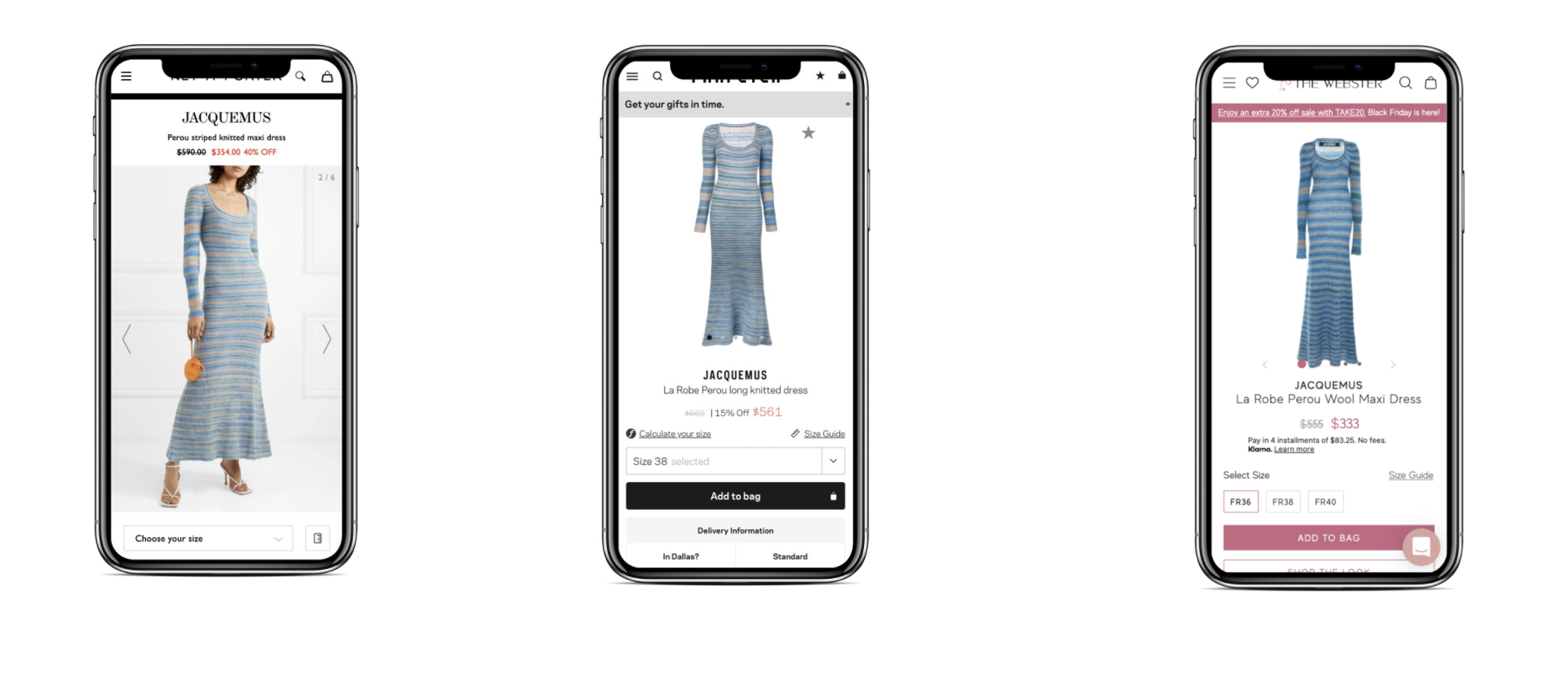
Competitor analysis was done by shopping for the same exact product across several different retail brands, the Jacquemus Perou Dress.
The Chrome extension, wappalyzer, made it possible to review competitor tech stacks.
Google reviews, indicated a large disconnect between brand imagery, the in store shopping experience, and the online experience.
Copywriting for the product description on TheWebster failed to identify key details an online shopper utilizes to make decisions. Including details like what size the model is wearing in the product photo provides more context for the user.
Competitor sites had bright photos with higher contrast and saturation.
The Webster had the most competitive price yet did not appear on the first page of Google’s mobile index.
Reviewed guest checkout experiences across various luxury industries.
Made note of conventions, microcopy, feedback and what was in view above the fold
With further resources, I propose completing the checkout process on multiple luxury sites to observe the remainder of the online purchase experience. Confirmation email, shipment notifications, and further interactions based on the completion of checkout.
COMPETITOR SITES
UX RECOMMENDATIONS
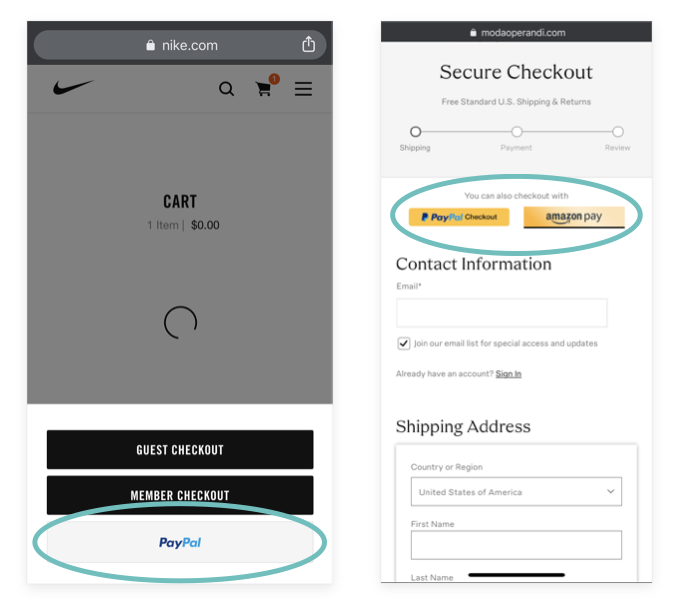
LEVERAGE ALTERNATE PAYMENT METHODS
Give customers the option to checkout with alternate payment methods to decrease the likelihood of abandonment.
Many online shoppers are power users who are accustomed to the using alternate payment methods.
UTILIZE CONVENTIONS
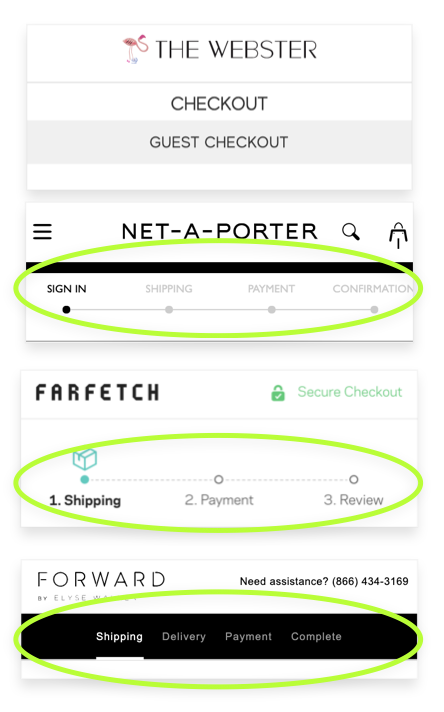
Clearly define where the user is in their guest checkout journey with visual cues about their journey.
Timelines and progress bars bring visibility to a quick checkout process.
Replace the duplicate checkout title with a progress bar to improve the checkout experience without taking limited mobile screen space.
REINFORCE SECURITY STANDARDS
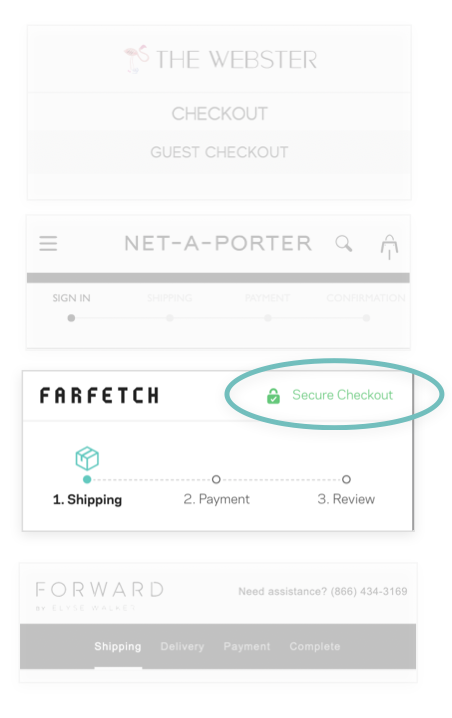
For The Webster, the security badge was in the footer, which is most likely not viewed by the User. It was not indicated by color or a recognizable icon.
Baymard Institute’s exhaustive UX study discovered that users feel more secure if payment fields appear to be more secure.
Many users felt more confident in the site’s security when badges were placed in close proximity to sensitive fields (such as payment fields). Sites can further emphasize security by visually encapsulating payment fields.
PROVIDE FEEDBACK
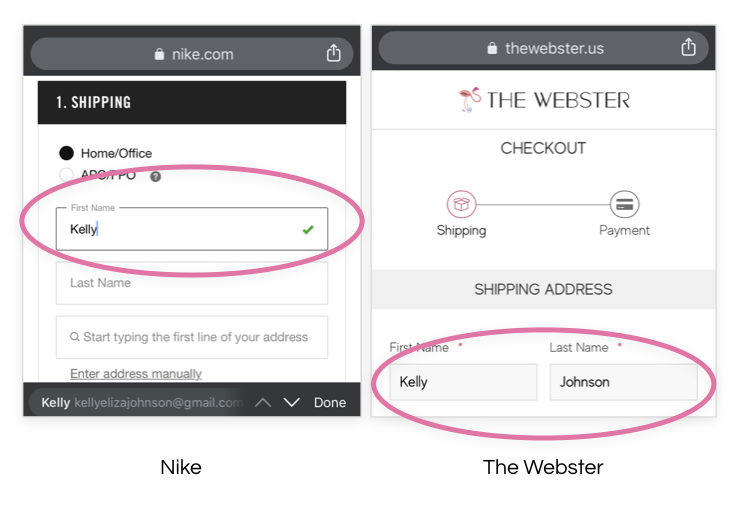
Provide a visual feedback cue that lets users know they have successfully completed a form
Visual cues can be identified by icons, active and inactive states and use of color
Positive feedback has been proven to enhance experience
FACILITATE EASE OF DATA ENTRY
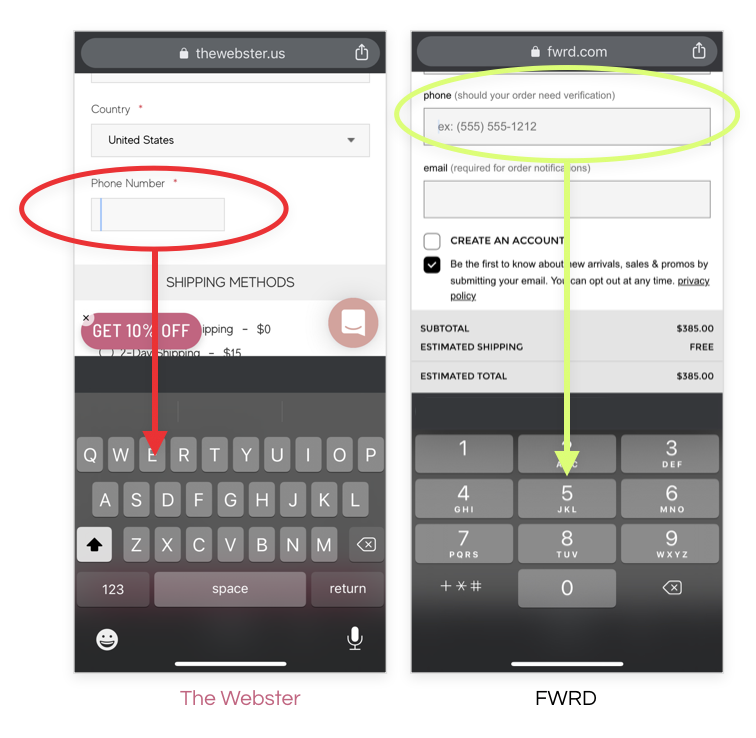
Reveal the appropriate keyboard depending on the type of form entry
Fields that require numbers should trigger the numeric keyboard
CHALLENGES & FURTHER CONSIDERATIONS
Tagging and implementation
Utilizing heat maps
Reducing the arrangement/ amount of plugins running